Box Office & Ticketing
Built to keep the line moving.
RTS gives your staff a fast, intuitive interface for selling tickets, selecting seats, adding concessions, processing refunds, and handling everyday box office transactions—all from one screen.
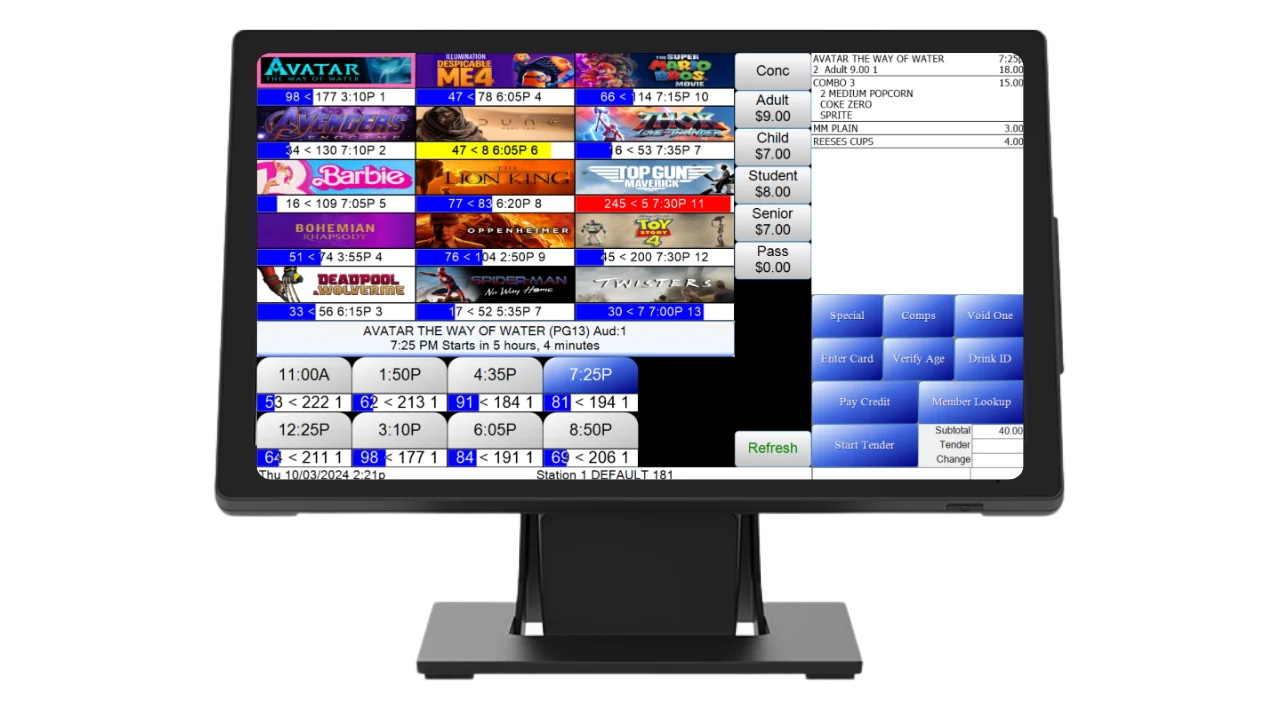
One Screen. Every Sale.
No wizards, no clicking through five pages to sell two adults. Films and showtimes are already on screen when your cashier looks up. They pick a time, tap tickets or pop out the seat map, flip to concessions, and take payment inside one transaction.
- 01
Pick the Film
Graphical film buttons with poster art, sorted by title or by auditorium.
- 02
Pick the Showtime
Every showtime is already on screen with live seats sold against capacity.
- 03
Tickets or Seats
Tap ticket types for general admission, or pop out the seat map.
- 04
Concessions & Tender
Flip to concessions without losing the order, then take any mix of payments.
RTS runs on Windows-based terminals and accessories. Interested in buying new equipment? Check out our hardware page.
See hardware →Everything the Register Needs
Comps, split payments, age checks and loyalty lookups are one tap away on the selling screen, and anything that needs a manager sits behind a password. Your newest cashier can work a sold-out Friday without calling for backup.
See it in a demoTicket Types & Price Classes
Adult, child, senior, student, matinee and passes, set up once. You decide which types sell online and which stay at the counter.
Comps & Discounts
Staff comp or discount without leaving the sale. Every one is password-protected and lands on the Comp Report, so nothing slips through.
Age & Rating Checks
R-rated titles prompt for ID on their own, reserved seating sales included. Nobody has to remember to ask.
Multi-Tender Payments
One parent pays cash, the other covers the rest on a card, the kids use a gift card. One transaction, with cash rounding built in.
Customer-Facing Display
Guests pick their own seats, watch their order build, add a tip and see the rewards they just earned.
Loyalty at the Counter
Find members in a tap and sign new guests up mid-sale with Register & Enter Card. An optional prompt reminds staff to ask.
Gift Cards & Super Saver
Sell, reload and redeem gift cards at the register. Super Saver tickets redeem on reserved performances too.
Surcharges & Fees
Offset card processing costs with an optional surcharge or transaction fee. New York All-In Pricing is supported.
Advance Sales
Sell next Friday as easily as tonight. Pick a date and the first show of the day is already selected.
Pay at Counter
Guests start an order online or in the app and pay when they arrive, using a short-lived code that keeps redemption secure.
Events & Private Screenings
Tie events to specific films, flag private screenings, and set up one-day promotions like National Cinema Day in minutes.
Sell-Out Control
Live seat counts that already leave out broken seats, and manager approval before anyone oversells a house.
Refund Entire Show
Projector down or power out? Close the performance and refund every guest in one action, online sales included, behind its own password permission.
Pickup & Door Scanning
Online buyers pick up from the selling screen, and the Usher App scans barcodes and QR codes at the door.
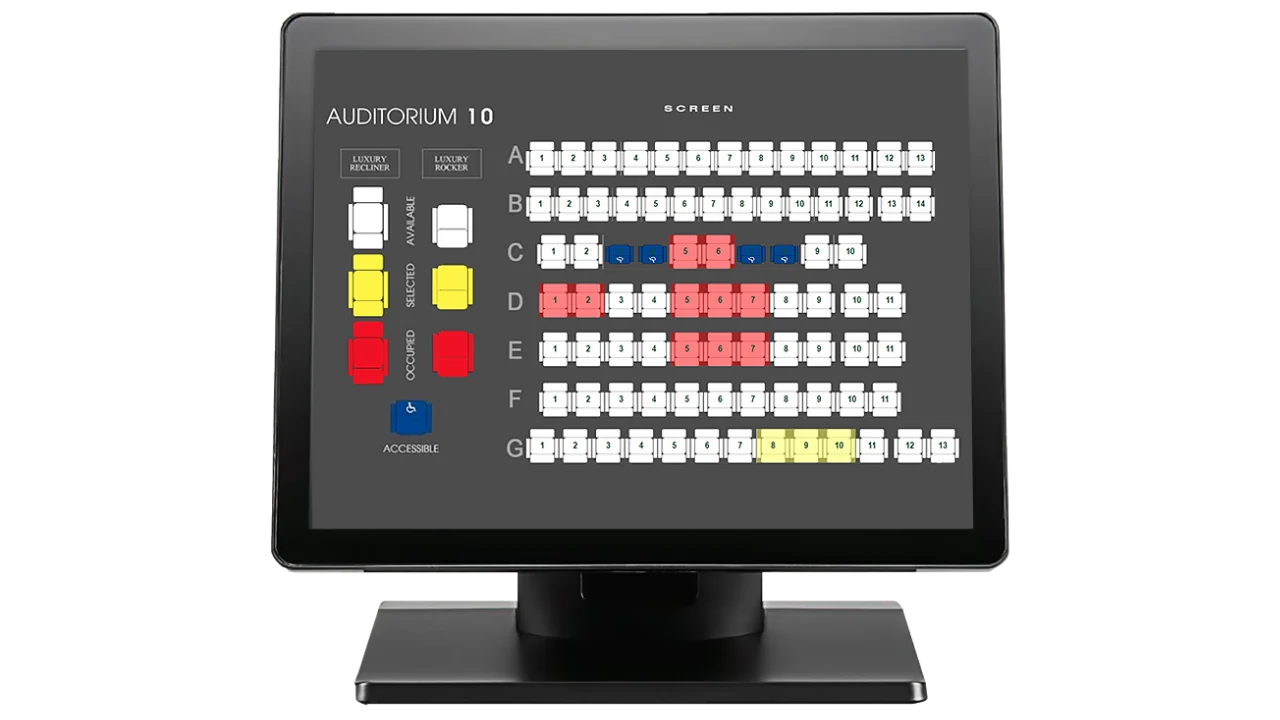
Your Auditorium, On Screen
Our in-house media team builds a custom seat map for every auditorium, drawn to match your actual room: rows, aisles, recliners and all. Your staff manage it right from the selling screen.
Custom Maps, Built for You
Our media team designs your seat maps in-house, and they carry over to online, app and kiosk sales.
Seat Types & Pricing
Premium and standard seating with their own prices in one auditorium.
Broken Seats
Mark or clear broken seats from the selling screen, with the employee logged.
Seat & Auditorium Swaps
Move a party or a whole show, with a swap report listing every affected guest.
Held Seats Release
Seats held mid-transaction free up reliably instead of sitting stuck.
Drive-In Mode
Reserved spaces, including general seating inside reserved spaces.
Four Ways to Sell Your Seats
Set each auditorium up the way it actually runs, and change it when your business does.
- Open seating
- Reserved seat
- Premium reserved seat
General Admission
No seat maps at all. Sell by showtime and capacity, and let guests sit where they like.
All Reserved
Every seat is assigned. Guests pick their spot at the counter, online, in the app or at the kiosk.
Reserved, Priced by Seat Type
Every seat is assigned, and premium seats like recliners carry their own price.
General & Reserved Together
Reserved seats and open seating in the same auditorium, sold in the same transaction.
Your System Works Together
The box office is the center of RTS, not a separate piece. Your website, app and kiosks sell from the same schedule, seats and ticket types, so a seat only ever sells once.
Scheduling & Film Management
Drag-and-drop showtimes, amenities, ticket rules and TMS/LMS export.
Learn moreOnline Ticketing
The RTS Web App on your website, with the same seat map as the box office.
Learn moreBranded Mobile App
Your theatre's own app for showtimes, tickets, loyalty and concessions.
Learn moreSelf-Service Kiosks
Ticket sales and pickups that keep the counter line short.
Learn moreLoyalty & Memberships
Points, rewards and membership programs your staff can sell at the register.
Learn moreGift Cards
Physical and online gift cards, redeemable across every channel.
Learn moreConcessions & Food and Beverage
Combos, order routing, kitchen displays and tabs in the same transaction.
Learn moreReporting & Payments
Integrated processing, box office and film rental reports, and accounting export.
Learn moreBox Office Questions
Does RTS handle general admission and reserved seating?
Yes. Each auditorium can run either way, and the selling screen follows the performance.
Can we refund a whole show if something goes wrong?
Yes. Refund Entire Show closes the performance and refunds every ticket in one action, online sales included.
Does it work for drive-ins?
Yes. Drive-in mode supports reserved spaces, general seating within reserved spaces, and drive-in ticket checks.
How long does it take to train staff?
The selling screen was designed by an operator to keep training short, and our team schedules training with you during onboarding.
See It Sell
Book a live demo of the RTS box office with our team.