Usher App
Check guests in at the door with a phone.
The RTS Usher App is a ticket scanning app for movie theaters. Staff scan a guest's ticket with a phone or tablet camera, see the whole order, and check everyone in with one tap.
Scan, Check, Wave Them Through
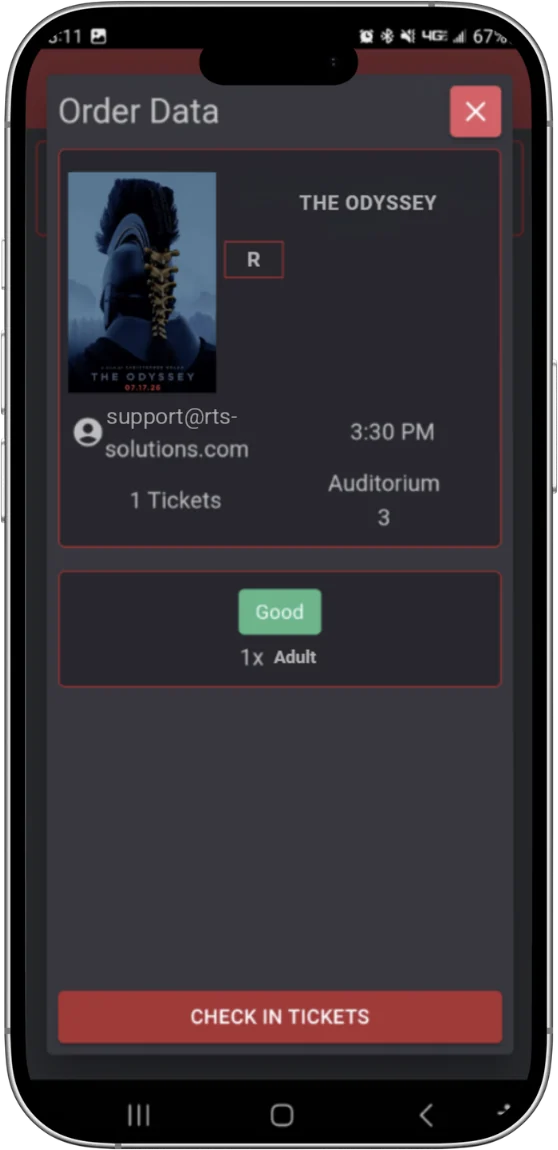
Every scan pulls up the full order, so staff can see who they're letting in before they tap.
Scan the ticket
Point the camera at the guest's printed or mobile ticket. A flashlight button helps in a dark hallway.
See the order
The film, rating, showtime, auditorium, buyer's email and every ticket in the order.
Check it
Each ticket shows a color-coded status, so staff can see right away if it's early, late or already used.
Check them in
One tap checks in the whole order and records it in RTS.
Default window shown. Each side adjusts from 1 to 1,440 minutes.
You Decide How Early Guests Get In
By default, tickets check in from 45 minutes before showtime to 45 minutes after. Set your own window before and after the show, anywhere from one minute to a full day, to match how your theatre runs.
Anywhere There's a Door
Because it runs on a phone or tablet, the Usher App goes wherever your guests come in.
Auditorium entrances
Scan tickets right at the theatre door.
Drive-in gates
Check cars in at the gate from a phone, with no full selling station out in the lot.
Opening nights
Add more people scanning on your busiest nights without adding more registers.
Ready in Minutes
No app store, no extra hardware. Most Android phones and tablets work. Check with RTS support before buying new devices.
- 1
Give staff access
Turn on Usher App access for each employee in RTS.
- 2
Add it to the home screen
Open the Usher App in Chrome, Firefox or Edge and save it to the home screen. It opens full screen like any app.
- 3
Connect and sign in
Point it at your RTS server once, then staff sign in and start scanning.
Set It Up Once. It Works Everywhere.
The Usher App checks in tickets from every place you sell them, because it runs on the same system.
Questions Operators Ask
Do I need to buy scanners?
No. The Usher App uses the phone or tablet camera to scan tickets.
What devices does it work on?
The Usher App is set up for Android phones and tablets with a camera that can read QR codes. Check with RTS support before buying new devices, cases or scanner accessories.
Does it need an internet connection?
Scanning and sign-in only need to reach your RTS server on your network, not the wider internet.
What if someone tries to use a ticket twice?
The second scan shows Already Picked Up, so staff know the ticket has been used.
Can I change when tickets can be checked in?
Yes. Set how many minutes before and after showtime check-in is allowed.
Does it work with online and app orders?
Yes. It checks in online and app orders by scanning the ticket barcode.
See It in Action
Book a live demo of the RTS Usher App with our team.