Film Scheduling
Build your week by dragging films onto a timeline.
Pick a film, drop it into an auditorium at the time you want, and open it for sale. Every showtime you schedule is ready to sell at the box office, at the kiosk and online.
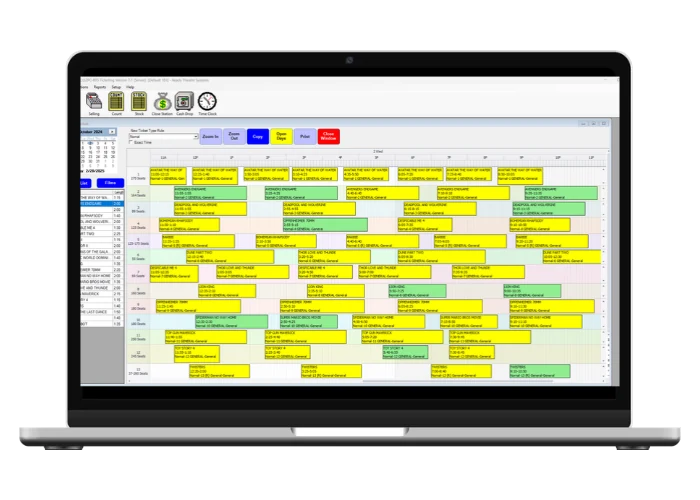
From New Release to On Sale
Everything happens in one window, so you aren't jumping between screens to get a film on sale.
Add the film
Choose it from the Internet Film List and RTS fills in the details for you.
Drop it on the timeline
Click a time in the auditorium you want. The film appears as a block you can drag to adjust.
Copy the rest
Copy the schedule across a date range instead of building each day by hand.
Open for sale
Open a single show or a whole date range, and it is ready to sell everywhere you sell tickets.
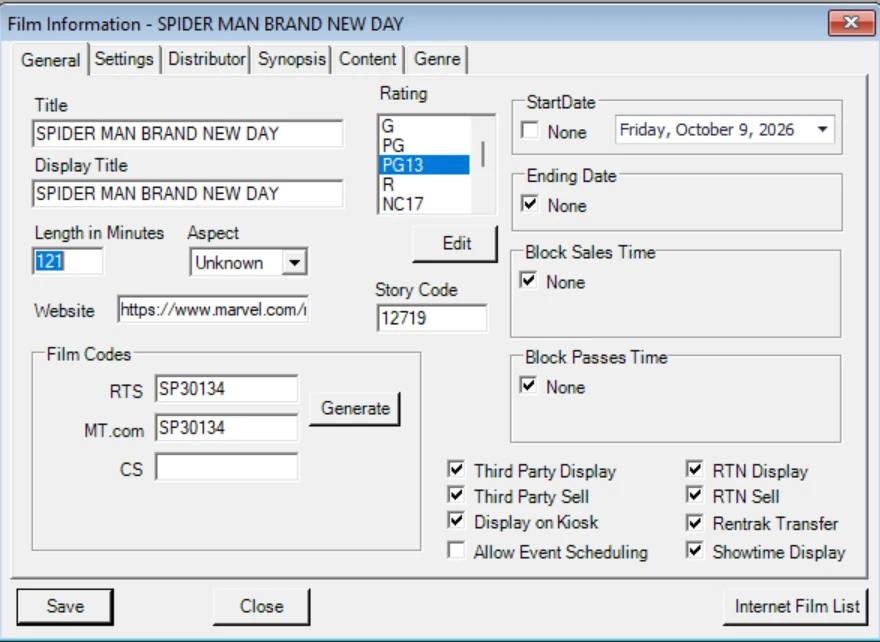
Search the Title. RTS Fills in the Rest.
RTS keeps a database of past, current and upcoming films. Search for a title, select it, and the film comes in with its synopsis, film codes and artwork already attached.
- Posters, title art and film buttons download for your selling screens and digital signage.
- The synopsis shows on your selling screen and kiosk.
- 3D titles come in with the 3D setting already checked.
- Assign the distributor once, and it stays with the film for reporting.
See What's Planned, On Sale and Selling
Every showtime is color-coded, so you can tell which shows are still being planned, which are on sale and which already have tickets sold.
Green: Scheduled
The show is on the schedule but not on sale yet, so you can keep adjusting.
Yellow: On sale
The show is open for sale and guests can buy tickets.
Red: Tickets sold
The show has tickets sold. If you move it, RTS asks first, and the sold tickets move with it.
Set It for the Week. Adjust Any Single Show.
Set defaults once for a batch of shows, then change one showtime without touching the rest.
Ticket rules by default
Choose the ticket class rule before you schedule, and every show you add uses it. No editing shows one by one.
Pricing per showtime
Change the price category or the ticket types offered on any single show.
Amenities that carry through
Add amenities like closed captions to the film and auditorium, and they apply when you schedule.
Online on or off
Choose per show whether it displays online and whether it sells online.
Exact start times
Schedule in five-minute steps, or switch on exact time for any start you need.
Fix display titles any time
Change the title guests see on your website, app and signage whenever you need, without touching tickets already sold.
Schedule Once. It Shows Up Everywhere.
Your schedule drives everything else. Each film has simple on and off switches for where it appears.
Selling screens and kiosks
Showtimes appear for staff and on self-service kiosks, with film artwork on the buttons.
Your website and app
Display and sell on your RTS-provided purchase pages and branded app.
Third-party ticketing sites
Choose separately whether a film displays and whether it sells on outside ticketing sites.
Digital signage
Showtimes and posters feed your lobby and menu boards.
Theatre management systems
Exports update your TMS or LMS automatically, with formats for GDC, AAM, Cinema Ace, TCC, Rosetta Stone and NCM. Features like open captions can be added to the exported title so the right playlist plays.
Box office reporting
Grosses go to Comscore, Numero and Hollywood Software automatically when you close tickets each night, and EBORs go out to your distributors.
Your System Works Together
The shows you schedule are the shows you sell, wherever guests buy.
Box Office & Ticketing
Sell every showtime at the counter.
Learn moreOnline Purchase Pages
Showtimes go live on your website.
Learn moreMobile Apps
Showtimes and amenities in your app.
Learn moreSelf-Service Kiosks
Showtimes ready for lobby sales.
Learn moreDigital Signage
Showtimes and posters on your screens.
Learn moreQuestions Operators Ask
Can I copy last week's schedule?
Yes. Copy the schedule across any date range, then adjust the shows that change.
Do I have to enter film details by hand?
No. Choose the film from the Internet Film List and the synopsis, film codes and artwork come with it.
Can I move a sold-out show to a bigger auditorium?
Yes. Change the show's location in the scheduler and the sold tickets go with it. Reserved seats move to matching seats in the new auditorium.
Can I start a show at 7:02 instead of 7:00?
Yes. Turn on Exact Time to schedule outside five-minute steps.
Does the schedule feed our TMS?
Yes. RTS exports your schedule to your theatre or library management system and keeps it updated automatically. It works with GDC, AAM, Cinema Ace, TCC, Rosetta Stone and NCM.
Can a film show on outside sites without selling there?
Yes. Displaying and selling are separate switches, for third-party sites and for your own pages.
What happens to old films in the list?
Clean List hides older films from the scheduler without deleting them, and you can bring them back any time.
See It in Action
Book a live demo of the RTS film scheduler with our team.