Reporting
Know how last night went before you get to the theatre.
Box office, concessions, cash, staff and inventory, all from one system. Watch tonight's numbers live, check them from your phone, and get the night's reports in your inbox the moment you close.
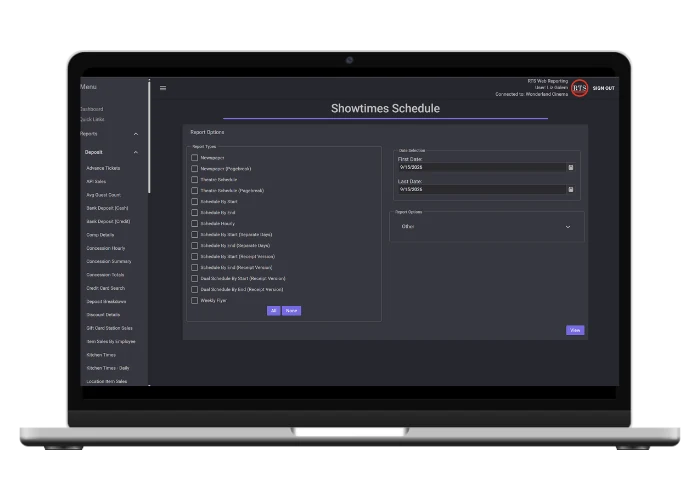
At the Theatre, on Your Phone or in Your Inbox
The same reports, wherever you are. Nothing to export, and nothing to piece together from different systems.
The full report library
Run any report for any date range from any RTS computer, then print it, save it or email it.
- Filter by station with report groups
- Print or save as PDF
Reports in any browser
Sign in from a phone, tablet or laptop and start with a dashboard of your sales.
- Add it to your home screen like an app
- View-only, so nothing gets changed by accident
The night, delivered
Pick who gets which report, and RTS sends it as soon as the night is closed.
- Shift report when the deposit closes
- Daily Tickets and Three Day Totals when tickets close
Watch Tonight Happen, Not Just Last Night
Monitors and station reports read live sales, so managers can see how the night is going without waiting for close.
- Ticket Monitor
- Tickets sold for every show right now, before anything is closed.
- Sales Monitor
- The day's sales as they come in.
- Drawer Status
- Cash in each open drawer, with drops, cash sales and card sales.
- Open Stations
- Every station with an open drawer. Anything open more than 48 hours is highlighted.
- Closed Stations
- Closed stations waiting on the deposit, to check before you finish the night.
A Report for Every Question You Ask
Every report pulls from the same sales, so the box office, the stand and the office are always looking at the same numbers.
Box office and attendance
How many came, and to what.
Daily
One day's ticket sales and admissions.
Screenvision Attendance Summary
Attendance by film and location for any date range.
Top Attendance
Your busiest days of the year.
Deposits and cash
What came in, and whether it balances.
Deposit Total
The full picture of a day's deposit.
Three Day Totals
Rolling three-day and seven-day totals.
Waste Details
Everything wasted, with the reason.
Concessions and inventory
What sold, and what's left.
Concession Sales vs Inventory
What sold compared with how stock moved.
Inventory Remaining
Days of supply left, based on recent sales.
Cost on Hand
The value of what's on the shelf.
Staff and labor
Who worked, and what it cost.
Payroll
Hours times rate for any pay period.
Labor Cost
Labor dollars and percentage against sales.
Item Sales by Employee
Who sold the most, for upsell contests.
Guests
Who keeps coming back.
Current Balances
Each card's balance and spendable loyalty points.
Activity Log
Every visit on a card, including points earned and rewards redeemed.
Membership Sales
Memberships sold and new cards registered.
Online sales
What sold outside the building.
Advance Ticket Search
Find presold tickets and export the list to Excel.
Online Gift Purchase Report
Gift cards bought online, with search.
Sales Log Export
Every transaction, as a clean CSV.
Comscore
Daily grosses, sent at close
Numero
Daily grosses, sent at close
Hollywood Software
Sales data, sent automatically
MaccsBox
EBORs to your distributors
Close Tickets. Your Grosses Go Out.
When you close tickets at the end of the night, RTS sends your box office grosses to the reporting services you use, and EBORs to your distributors. You can preview exactly what was sent, line by line.
Send It to Your Books, Your Spreadsheets or Your Accountant
Your numbers don't stay locked in RTS. Post deposits to your accounting software or pull clean data into Excel.
QuickBooks Online
Each closed deposit posts to QuickBooks Online automatically as a journal entry, mapped to your accounts.
QuickBooks Desktop
Export your deposits as a file QuickBooks Desktop can import.
Microsoft Dynamics
Export your RTS data to Microsoft Dynamics.
Clean CSV exports
Sales logs, concession lists and weekly recaps open in Excel one value per cell, ready to sort and total.
Excel from Web Reporting
Export any web report to Excel to share it.
Payroll exports
Send hours to ADP, Paycor, PrimePay or Tandem, or as a CSV.
Your System Works Together
Every part of RTS feeds the same reports.
Questions Operators Ask
Can I check reports from my phone?
Yes. Web Reporting works in any phone or tablet browser, and you can add it to your home screen. It's view-only, so nothing can be changed from it.
Can reports be emailed to me every night?
Yes. Choose who gets the shift report, Daily Tickets and Three Day Totals, and RTS emails them as soon as the deposit or tickets are closed.
Why doesn't today's attendance show up yet?
Attendance reports count shows once their tickets are closed. For live counts during the day, use the Ticket Monitor.
Does RTS report to Comscore?
Yes. Grosses go to Comscore automatically when you close tickets, along with Numero, Hollywood Software and EBORs if you use them.
Can I get my data into Excel?
Yes. CSV exports like the Sales Log open in Excel with one value per cell, ready to sort and total.
Does RTS work with QuickBooks?
Yes. Closed deposits post to QuickBooks Online automatically, and QuickBooks Desktop users can export deposits to import.
See It in Action
Book a live demo of RTS reporting with our team.